|
Don't miss this FREE Webinar! Because in 2021, there's a major changes in the way you code and document the level of Evaluation and Management for the Office Visits. I am also going to talk about the Prolonged Services. Seats are limited! Make sure you register asap! You can register here: -->> https://bit.ly/2Nnk5md and make sure to bookmark your calendar!- February 9th, Tuesday at 2:00PM EST. #cptcoding2021 #emchanges2021 #medicalpracticemanagement #evaluationandmanagement #painmanagementphysicians #orthopedicsurgeons #surgerycenters #surgeons #healthcaremanagement #healthcareconsultant #medicalbillingandcoding #revenuecyclemanagement # #webinar #healthcare #training #medicalpracticeindustry #ehrs REGISTER TODA AND LEARN THE! 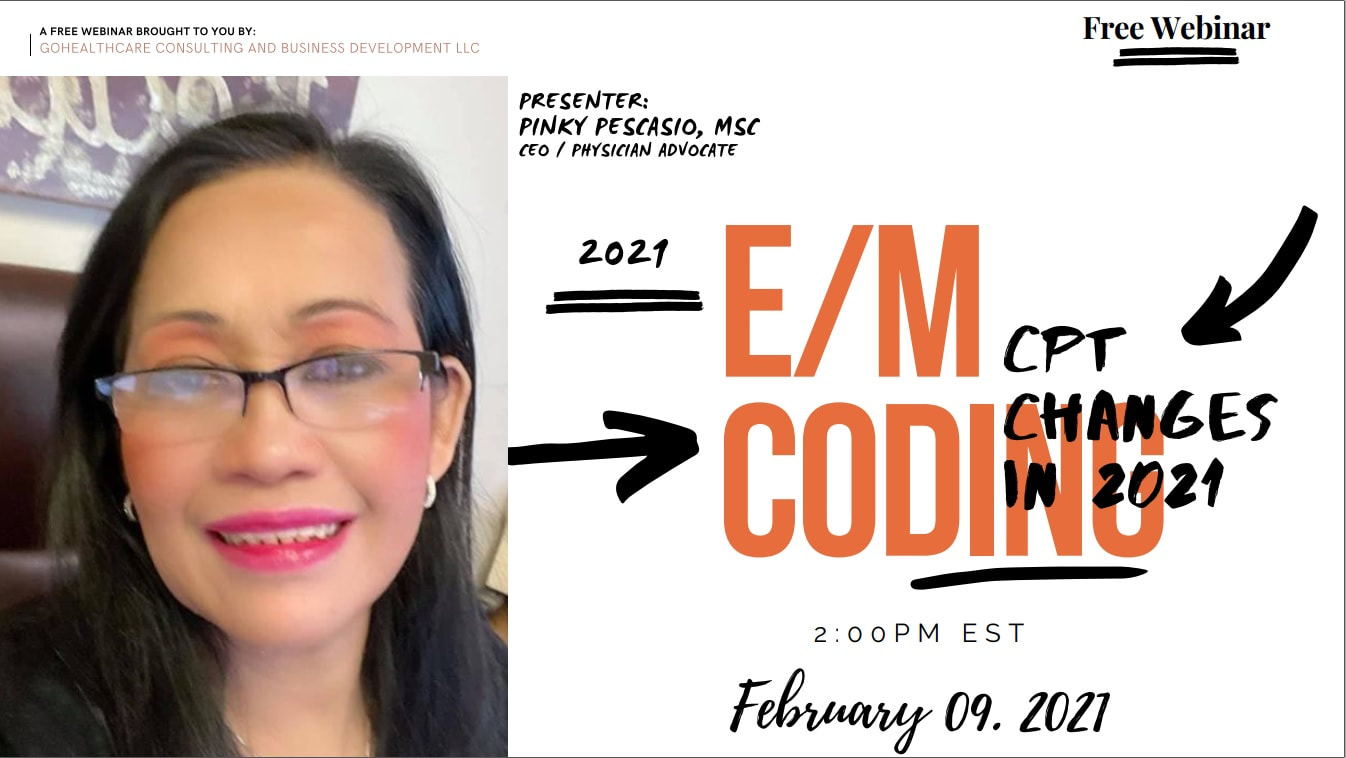
0 Comments
ASC Billing for Out of Network Facility Claims When you are an out of network Ambulatory Surgery Center, it is always a struggle to get paid and have your claims get processed appropriately. It upsets the patients and much more, the ASC loses revenue. This blog post is about ASC Billing. And I am going to give you some ASC Billing Scenarios and how to tackle them. It is always wise that you have a system in place in the practice. Because I will tell you, ASC Billing is not easy. But once you understand the process, its not really too bad. These tips can be used for any practice services. Mostly I kept these in mind for our clients Pain Management Billing, Anesthesia Billing and Orthopedic Spine Billing. ASC Billing Tip: We should always remember, if the Professional Services are not Authorized, it's unlikely the ASC Facility will get paid/processed for their portion.  In the perfect world of ASC, the ASC always relies on the Providers' services being verified and authorized. They have to work together, hand in hand. So here are my ASC Billing Tips for an Out of Network Facility:
NEXT; ASC Billing tip: Educate your patient about the Ambulatory Surgery Center being out of network. Because your dilemma will be, the patient will likely get the check because the payer may send it to their members! I can name some of the Insurance Payers that does this! So it is always wise to let them know checks might be directly sent to them by their insurance company. All they have to do is to endorse (sigh the back of the check) and send the check to the practice. And also don't forget to let your patient know about their out of network benefits (deductible & coinsurance). It's very important that your patients knows what to expect about the ASC being an out of network facility. ASC Billing Claims Submission tips:
So what's next for ASC Billing when claims are Denied, Rejected or Inappropriately Processed? You don't want to miss that revenue opportunity for the Out of Network Facility Fee. Out of network fees are always based on UCR (Usual and Customary Rates) based on your location. Normally I have seen up to 300% or (even more!) of Medicare Fee Schedule. At times, you will also be negotiating fees with 3rd party claims repricing companies. So be careful when negotiating your fees. You can call our office and we can guide you how to negotiate your fees. Don't be fooled. Remember, they are not the insurance company, they are just the claims repricing companies. If you don't agree with what they want to negotiate with you, send it back to the patient's primary insurance company. You can always call us if you need help in negotiating out of network fees. Contact us here. What we should do for all our UNPAID Claims:
I mean, you need to know the determination that was made on your claims and then you can take action. But moving forward, just make sure you have a team in your practice that only does Patients Access and Prior Authorization. References Source: https://www.cms.gov/Center/Provider-Type/Ambulatory-Surgical-Centers-ASC-Center Commercial Payers Public Domain Websites CPT Coding Guidelines through the American Medical Association  |
 Pinky Maniri is the Founder & CEO of GoHealthcare Practice Solutions and a sought-after national healthcare speaker. She speaks at select medical conferences and industry events, including Becker’s Healthcare and PAINWeek. 
search here |

- Who we are
- Leadership
- Advisory Board
- What We Do
- RCM
- Case Studies
- Knowledge Center
-
Specialty Guides
- MSK Radiology & Diagnostic Imaging
- Hand & Upper Extremity Guide
- Spine Specialty Hub
- Occupational Medicine / Workers’ Compensation MSK
- Pain Management Specialty Hub
- Neurosurgery Specialty Hub
- Orthopedic Surgery Specialty Guide
- Physical Medicine & Rehabilitation (PM&R) Specialty Hub
- Sports Medicine
- Ambulatory Surgery Center Specialty Hub
- GoHealthcare AI Governance Center
- CLIENT PORTAL
- READ OUR BLOG
DISCLAIMER PRIVACY POLICY TERMS OF USE CONTACT US TESTIMONIALS
GOHEALTHCARE KNOWLEDGE CENTER
Search GoHealthcare Practice Solutions
Search our procedure library, specialty guides, prior authorization resources, revenue cycle guidance, case studies, AI governance content, compliance resources, and healthcare operations insights.
Popular:
Search results open in a new browser tab.
© COPYRIGHT 2026 GoHealthcare Practice Solutions LLC. ALL RIGHTS RESERVED.